
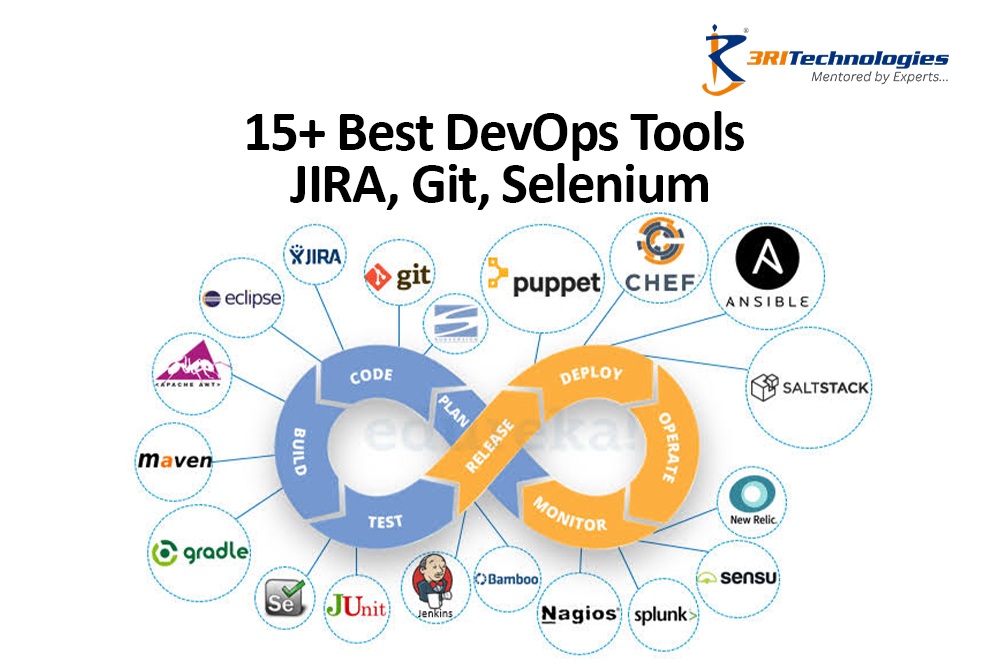
How do companies like Netflix, Amazon, and Google ship new features so fast without things falling apart? Simple — DevOps, powered by the right set of tools. These tools handle everything from code management and automated testing to continuous integration and cloud deployment, making the whole development process faster and smoother. No matter where you are in your career—just starting out, still studying, or already working and want to upskill—knowing these tools matters. Thinking about DevOps classes in Pune or hands-on training with 3RI Technologies? This is the starting point.
What Are DevOps Tools and Why Do They Matter?
DevOps tools are software applications that help development and operations teams collaborate, automate, and streamline the entire software delivery lifecycle. They cover everything from code authoring and testing to incident management, deployment, and monitoring.
To put it simply, these instruments eliminate human error and manual bottlenecks from repetitive processes. Teams are able to release software more quickly, more consistently, and with fewer errors as a result. As companies increasingly adopt cloud-native architecture and microservices, the demand for professionals skilled in these tools continues to rise steadily.
Why Do DevOps Tools Matter?
- Boost cooperation between the operations and development teams
- Automate repetitive development and deployment tasks
- Reduce software delivery time
- Reduce human mistake
- Improve the dependability and quality of applications
- Encourage Continuous Deployment and Integration (CI/CD)
Today, organizations across banking, healthcare, retail, cloud computing, and IT services actively seek professionals skilled in the latest devops tools, making practical training increasingly valuable. Learners enrolling in a DevOps Course in Pune often gain hands-on exposure to these industry-standard platforms.
Top 15 DevOps Tools Every Beginner and Professional Should Know
The most recent devops tools for version control, CI/CD, configuration management, containerization, and monitoring are listed in the carefully curated list below.
1. Git
Git is usually the very first tool any DevOps beginner learns, and there’s a good reason for that. Because every change is tracked and can be undone if something goes wrong, it allows numerous developers to work on the same codebase simultaneously without stomping on each other’s toes. Because it works offline and syncs whenever you’re ready, teams spread across different cities or time zones can still collaborate without delay. Most other tools in this list, including GitHub, GitLab, and Jenkins, are built around Git in one way or another.
Key Features
- Version control that is distributed
- Merging and branching
- Code history tracking
- Fast collaboration
- Easy rollback to previous versions
Pricing
- Completely free and open source
2. GitHub / GitLab
While Git tracks changes to code, GitHub and GitLab give that code a proper home online. These platforms make it easy for teams to review each other’s work through pull requests, leave comments, and catch mistakes before they ever reach production. They also come with automation pipelines built right in, so one platform can handle code storage, testing, and deployment together. For students building a portfolio or teams managing large projects, having everything under one roof genuinely saves time.
Key Features
- Hosting of Git repositories
- Code reviews and pull requests
- GitHub Actions for CI/CD
- Team collaboration
- Security scanning
Pricing
- Free plan available
- Paid plans for businesses and enterprises, start around $4 to $21 per user/month
3. JIRA
JIRA isn’t about writing code at all, it’s about keeping everyone organized while the code gets written. Product managers, developers, and testers use it daily to plan sprints, assign tasks, and follow bugs from the moment they’re reported to the moment they’re closed. Its visual boards give the whole team a quick, honest sense of what’s moving forward, what’s stuck, and what still needs attention. That kind of clarity is exactly why so many agile teams treat JIRA as their daily command centre.
Key Features
- Project management that is agile
- Backlog management and sprint planning
- Bug and issue tracking
- Workflow automation
- Integration with hundreds of DevOps tools
Pricing
- Up to 10 users are free.
- The standard package begins at about $8 per user each month.



4. Jenkins
Jenkins has quietly powered software releases for well over a decade, and it’s still one of the most trusted automation servers around. It keeps an eye on a code repository, and the moment new code lands, it automatically triggers builds, runs tests, and pushes deployments without anyone needing to lift a finger. Since it’s open-source and highly customizable, teams can bend it to fit almost any workflow using its enormous plugin library. Many organizations still rely on Jenkins as the engine running silently behind their release pipelines.
Key Features
- Integration that never stops (CI)
- CD stands for Continuous Deployment.
- Pipeline automation
- Extensive plugin ecosystem
- Automated testing
Pricing
- Free and open source
5. Docker
Docker solved one of software development’s oldest frustrations, the classic “it works on my machine, but not on yours” problem. Docker ensures that software performs precisely the same on a developer’s laptop, a testing server, or a live production environment by packing an application and everything it needs to execute into a single container. This consistency has made containers a standard part of how modern applications get built and shipped, especially in microservices-based systems.
Key Features
- Lightweight containers
- Environment consistency
- Fast application deployment
- Resource optimization
- Easy scalability
Pricing
- Community Edition is free
- Business plans start at $5 per user/month
6. Kubernetes
Once a team is running dozens, or even hundreds, of containers, managing them by hand simply isn’t realistic anymore, and that’s exactly where Kubernetes steps in. It decides automatically where each container should run, restarts anything that crashes, and scales applications up or down based on real demand. Originally developed by Google, it has since grown into the industry standard for running containerized applications at scale. That widespread adoption is why Kubernetes has become a must-learn skill for anyone serious about a DevOps career.
Key Features
- Container orchestration
- Auto scaling
- Self-healing capabilities
- Load balancing
- High availability
Pricing
- Open source
- Managed services available on AWS, Azure, and Google Cloud
7. Selenium
Selenium takes the slow, repetitive job of testing websites and hands it over to automation instead. Rather than a tester manually clicking through every single page after each update, Selenium scripts can simulate real user actions across multiple browsers in just a few minutes. This doesn’t just save time, it also catches bugs earlier, well before they ever reach an actual user. It’s a favorite among QA teams precisely because it fits so naturally into CI/CD pipelines alongside tools like Jenkins.
Key Features
- Cross-browser testing
- Web automation
- Multi-language support
- CI/CD integration
- Open-source framework
Pricing
- Free and open source
8. Ansible
Ansible was built with simplicity as its main goal, and that shows in how it works. Instead of writing complicated scripts, engineers simply describe the state they want their servers to be in using plain, readable files called playbooks. Ansible then takes care of configuring dozens, or even thousands, of machines to match that exact state, without needing any special software installed on them beforehand. This agentless approach is a big reason why teams that want automation without added complexity tend to gravitate toward it.
Key Features
- Automation without agents
- Provisioning infrastructure
- Management of configurations
- YAML-based playbooks
- Cloud automation
Pricing
- Free open-source version
- Enterprise edition available
9. Puppet
Puppet takes a slightly different route to configuration management, with a strong focus on keeping systems consistent and compliant over the long run. Teams define infrastructure rules just once, and Puppet continuously checks servers against those rules, quietly correcting anything that has drifted out of line. This makes it especially valuable for large enterprises that need to enforce strict compliance and security standards across thousands of servers without relying on manual audits every time something changes.
Key Features
- Infrastructure automation
- Configuration management
- Compliance monitoring
- Centralized administration
- Scalable deployments
Pricing
- Open-source version available
- Enterprise subscription available
10. Chef
Chef treats infrastructure configuration almost like writing an actual recipe, complete with “cookbooks” that spell out exactly how a system should be set up from start to finish. Developers who are already comfortable writing code often find Chef’s approach quite intuitive, since it uses a Ruby-based syntax instead of a completely separate configuration language. It works particularly well for teams managing complex, frequently changing infrastructure that needs precise, repeatable setup instructions every single time.
Key Features
- Infrastructure as Code
- Automated server configuration
- Cloud deployment
- Compliance automation
- Scalable infrastructure
Pricing
- Open-source version
- Enterprise plans available
11. Terraform
Teams managing infrastructure across several cloud providers, including AWS, Azure, and Google Cloud, simultaneously have come to rely on Terraform. Instead of clicking through dashboards to manually set up servers, storage, or networking, engineers simply write configuration files describing exactly what infrastructure they need. Terraform then builds, updates, or tears it down automatically, which makes it far easier to track every change and avoid the kind of costly mistakes that come with manual setup.
Key Features
- Infrastructure as Code
- Multi-cloud deployment
- Automated provisioning
- Version-controlled infrastructure
- Cloud resource management
Pricing
- Open source
- Enterprise edition available
12. Prometheus
Prometheus was built specifically for the kind of fast-changing, containerized environments that tools like Kubernetes create. It continuously collects metrics from applications and infrastructure, storing them in a way that makes it simple to search and analyze later on. When something starts to go wrong, Prometheus can trigger alerts well before users even notice a problem exists. That reliability is exactly why it has become a standard companion tool in most modern monitoring stacks today.
Key Features
- Real-time monitoring
- Time-series database
- Alert management
- Kubernetes integration
- Performance analytics
Pricing
- Free and open source
13. Grafana
Raw metrics on their own are hard to make sense of, but Grafana turns all that data into dashboards that actually mean something at a glance. It connects easily with tools like Prometheus, pulling in data and displaying it through fully customizable charts and graphs. Teams use these dashboards to spot trends early, keep an eye on overall system health, and quickly pinpoint exactly where a problem might be starting, long before it grows into a major outage.
Key Features
- Interactive dashboards
- Data visualization
- Alerting system
- Multiple data source support
- Performance monitoring
Pricing
- Free version available
- Enterprise edition plans start around $8 per month
14. Nagios
For many years, Nagios has been a reputable brand in infrastructure monitoring, closely monitoring servers, apps, and network devices around-the-clock. It’s designed to alert teams the very moment something looks off, whether that’s a server running low on disk space or a service that has quietly stopped responding. For organizations that need dependable, no-frills monitoring without unnecessary complexity, Nagios continues to be a solid and widely trusted choice.
Key Feature
- Round-the-clock monitoring of servers, applications, and networks
- Instant alerting through email, SMS, or third-party integrations
Pricing
- Free open-source core; Nagios XI is a paid upgrade
15. SonarQube
Before apps are released, developers can find bugs, vulnerabilities, and code smells with the aid of SonarQube, a tool for code quality and security analysis. Teams can maintain cleaner, more secure, and maintainable code by incorporating SonarQube into CI/CD pipelines.It is frequently utilized in corporate DevOps settings and supports a variety of programming languages.
Key Features
- Analysis of static code
- Identification of security flaws
- Code quality metrics
- Technical debt analysis
- CI/CD integration
Pricing
- The Community Edition is free.
- There are editions for developers, enterprises, and data centers.
Benefits of using DevOps automation tools
Adopting DevOps top tools brings measurable improvements across the software development lifecycle. Organizations that automate their pipelines see faster releases and fewer production issues.
- Speed: Automated procedures reduce release cycles from weeks to hours.
- Reliability: Bugs are found through ongoing testing before they are put into production.
- Collaboration: Shared tools bring developers and operations teams onto one platform.
- Cost efficiency: Automation reduces manual effort and infrastructure waste.
- Better visibility: Monitoring tools offer real-time insight into system health.
- Scalability: Tools like Kubernetes and Terraform support growth without redesigning infrastructure.
Example: An e-commerce company using Jenkins, Docker, Kubernetes, and Prometheus can automatically build, test, deploy, and monitor applications, enabling frequent releases with minimal downtime.


Tips for Selecting the Right DevOps Automation Tool
It can be difficult to choose the best stack because there are so many DevOps tools accessible. Here are some helpful recommendations to help you make the decision.
- Clearly state the objectives of your project.
- Select tools that work nicely with the technological stack you already have.
- Prioritize automation capabilities.
- Consider scalability for future growth.
- Evaluate community support and documentation.
- Compare licensing and pricing.
- Look for cloud compatibility if deploying on AWS, Azure, or Google Cloud.
- Choose tools with robust security and compliance features.
- Test free versions before investing.
- Ensure the learning curve matches your team’s experience.
If you’re searching for Devops Classes Near Me, joining a practical training program can help you understand how these tools work together in real-world CI/CD environments instead of learning them individually.
Master DevOps Tools With 3RI Technologies’s Course
Reading about tools is a good starting point, but real expertise comes from hands-on practice. This is the point at which an organized learning route really helps. 3RI Technologies offers an industry-focused DevOps Certification Course designed to help beginners and professionals master Git, Jenkins, Docker, Kubernetes, JIRA, Selenium, and more through real project work.
As one of the Best DevOps Training Institutes in Pune, 3RI Technologies focuses on real-world scenarios rather than just theoretical concepts, helping learners build job-ready skills.
In summary, DevOps tools like Git, JIRA, Jenkins, Docker, Kubernetes, and Selenium form the backbone of modern software delivery. Understanding what each tool does, how to select the right one, and how to apply it in real projects is key to succeeding in today’s fast-moving tech industry. Whether you’re a student, a career switcher, or an experienced professional, investing in the right training—such as the DevOps Classes in Pune offered by 3RI Technologies—can accelerate your journey from learning concepts to building real-world DevOps pipelines with confidence.