
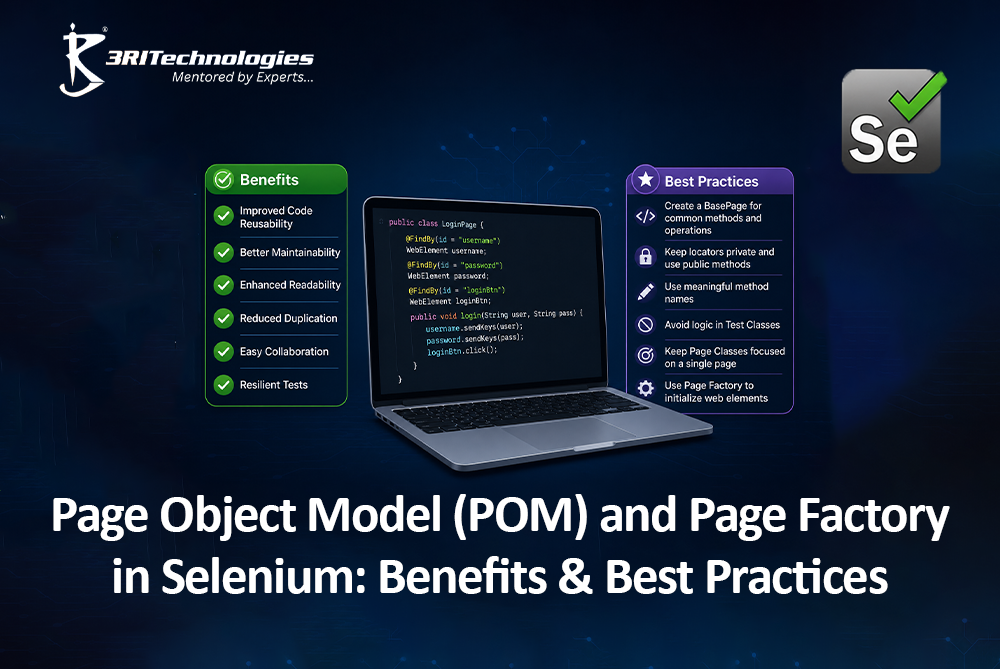
Selenium test scripts often become messy and hard to maintain when locators and test logic are mixed together. This is where the Page Object Model and Page Factory come in, offering a structured way to organize automation code. Together, they help testers build reusable, readable, and scalable test scripts. For anyone exploring Selenium courses in Pune, understanding these design patterns is a foundational skill that separates beginner-level scripting from professional-grade automation development. Both ideas are explained in this post in a clear, useful manner.
Understanding the Page Object Model (POM) in Selenium
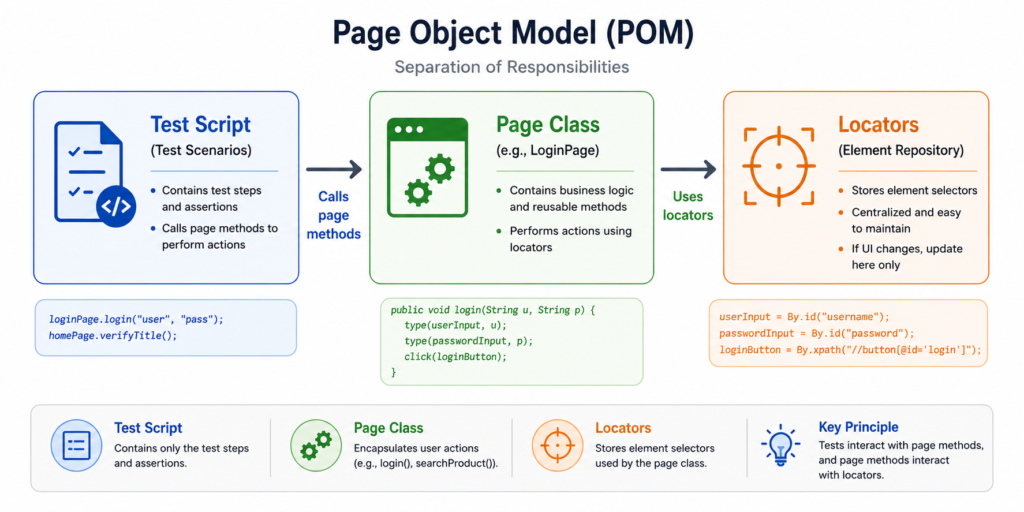
Every web page is treated as a separate class in Selenium’s Page Object Model design model. Every class contains the web elements (locators) and methods (actions) related to that specific page. Instead of writing locators repeatedly across test files, testers store them in one place, making the code easier to read and maintain.
This method keeps page-specific code and test logic apart. When a developer changes a button ID or a field name, testers only need to update it in one page class rather than searching through dozens of test scripts. This single change reduces maintenance time significantly, especially in large Selenium Webdriver projects with hundreds of test cases.
Core Components of a Page Object Model
A well-structured Page Object Model in Selenium typically includes:
- Web elements: Locators such as ID, name, XPath, or CSS selectors defined as class variables.
- Constructor: sets up the WebDriver object for that specific class of page.
- Methods: Actions like clicking buttons, entering text, or verifying page elements.
- Page class files: Every application page has a unique class.
- Test class: Calls the page methods to perform actual test steps.
How to Use the Page Object Model in Selenium
Implementing POM is straightforward once the structure is clear:
- Identify the web pages involved in your test scenario.
- Every page should have its own Java class.
- Declare all locators as private variables within that class.
- Write public methods that perform actions using those locators.
- Create a separate test class that calls these methods in sequence.
- Validations and assertions should be kept inside the test class rather than the page class.
Practical Example: Page Object Model in Selenium
Consider a login page built using standard POM:
- The login button, password field, and username field locators are stored in a LoginPage class.
- The class includes methods like enterUsername(), enterPassword(), and clickLogin().
- The test class simply calls loginPage.enterUsername(“test”) without worrying about how the element is located.
- Assertions and validations stay in the test class, keeping the page class focused only on actions.
- This separation keeps test scripts clean and business-focused, which is a core principle taught in any solid Selenium Classes in Pune.
Understanding Page Factory in Selenium
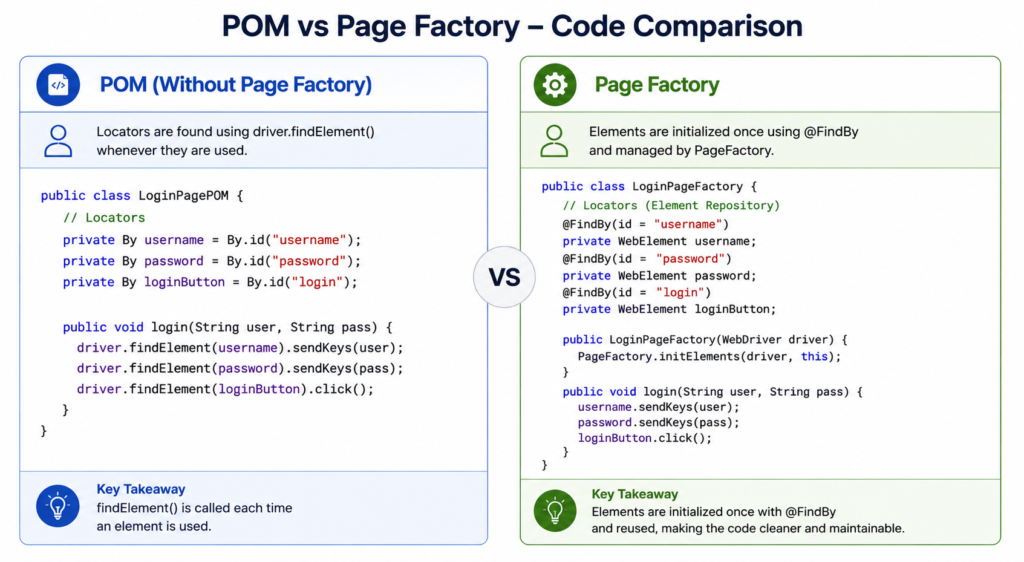
Selenium’s Page Factory is an extension of its own Page Object Model that makes element initialization easier. Page Factory employs annotations like @FindBy to declare locators directly above the variable declaration, as opposed to manually identifying items using findElement().This improves the code’s readability and clarity. Page Factory also introduces lazy initialization, meaning elements aren’t located until they are actually used in a test step, which can improve performance in certain scenarios.
Page Factory Implementation in a Selenium Project
To use Selenium’s Page Factory:
- Import the org.openqa.selenium. support. PageFactory package.
- Declare WebElements using the @FindBy annotation with the desired locator strategy.
- Initialize elements in the constructor using PageFactory.initElements(driver, this).
- Use these WebElements directly in methods without repeated findElement() calls.
- Keep the class structure similar to standard POM, just with annotation-based locators.



Practical Example: Page Factory in Selenium
Using the same login example, rebuilt with Page Factory:
- The class declares @FindBy(id = “username”) WebElement usernameField instead of writing driver. findElement(By.id(“username”)) every time.
- The password box and login button now have similar @FindBy annotations.
- The constructor calls PageFactory.initElements(driver, this) to activate these elements.
- This small change reduces boilerplate code and makes the class visually cleaner.
- It’s a technique particularly helpful for beginners learning Selenium Webdriver concepts for the first time.
Key Distinctions Between Page Factory and Page Object Model
While Page Factory is technically built on top of POM, there are practical differences worth understanding before choosing one for your Selenium Automation Framework.
| Feature | Page Object Model | Page Factory |
| Element Location | Uses findElement() explicitly | Uses @FindBy annotations |
| Initialization | Elements located each time they’re called | Elements initialized via PageFactory. initElements() |
| Code Readability | Moderate, more manual code | Higher, cleaner syntax |
| Performance | Standard element lookup | Supports lazy loading of elements |
| Learning Curve | Easier for absolute beginners | Requires understanding of annotations |
| Flexibility | More control over locator logic | Slightly less flexible for dynamic locators |
Both approaches achieve the same goal, better-structured, maintainable code, but Page Factory offers a more streamlined syntax once testers are comfortable with annotations. Many professionals preparing for a Selenium Certification study both patterns since interview questions frequently compare the two.
Benefits and Best Practices for Using POM and Page Factory
Both design patterns solve real problems that testers face daily when scaling automation projects across large web applications.
Key Advantages of Page Factory and POM
- Improved maintainability: Locator changes require updates in only one place.
- Code reusability: You can utilize page classes in more than one test script.
- Better readability: Test scripts read like plain business logic rather than technical locator strings.
- Reduced duplication: Common actions are written once and called repeatedly.
- Easier collaboration: Teams can divide work by page class, speeding up development.
- Scalability: Adding new test cases doesn’t require rewriting existing locators.


Best Practices for Building a Scalable Selenium Framework
- Keep locators private and expose only methods to the test layer.
- Avoid placing assertions inside page classes; keep them in test classes.
- Use meaningful, consistent naming conventions for classes and methods.
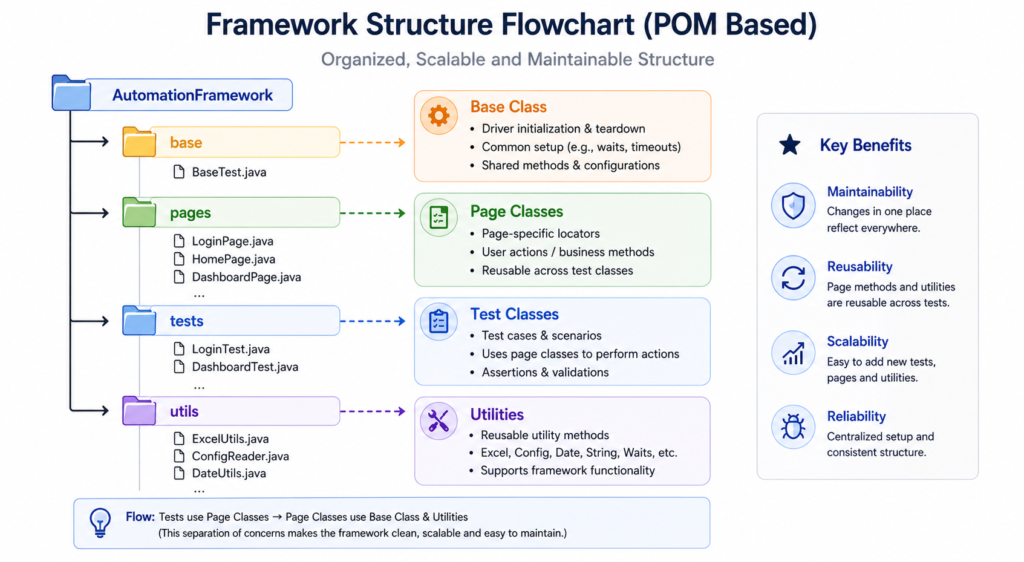
- Combine POM with a base class to avoid repeating WebDriver setup code.
- Integrate with TestNG or JUnit for structured test execution and reporting.
- Regularly refactor page classes as the application UI evolves.
Learners who want hands-on guidance often find that structured mentorship accelerates this learning curve considerably. 3RI Technologies offers practical, project-based training that helps students apply POM and Page Factory concepts to real applications, building the kind of portfolio that stands out to employers hiring automation testers.
Conclusion
The fundamental issue of maintaining clean, maintainable, and scalable automation code is addressed by both the Page Object Model and Page Factory. While POM offers more manual control, Page Factory simplifies element initialization through annotations. Choosing between them, or combining both, depends on project needs and team preference. Mastering these patterns is a valuable step for anyone building a career in test automation, and structured, focused Selenium Classes in Pune can help learners apply these concepts confidently in real-world projects.
Frequently Asked Questions
1. What is the primary distinction between Selenium’s Page Factory and Page Object Model?
POM requires manually locating elements using findElement(), while Page Factory uses @FindBy annotations and PageFactory.initElements() for simpler, cleaner element initialization.
2. Is Page Factory better than Page Object Model?
Neither is strictly better; Page Factory is an extension of POM that offers cleaner syntax, while POM gives more manual control over locator logic. Both are widely used in professional projects.
3. Do I need to learn POM before Page Factory?
Yes, understanding POM fundamentals first makes it much easier to grasp how Page Factory simplifies and builds upon the same design pattern.
4. Can POM be used with TestNG and JUnit frameworks?
Absolutely. POM integrates smoothly with both TestNG and JUnit, making it a standard choice for building scalable Selenium automation framework structures.
5. How does learning POM and Page Factory help my testing career?
These patterns are considered essential skills in most QA automation job roles, and demonstrating proficiency in them, often validated through practical training or a Selenium Certification, can significantly improve job prospects.